Seesaw
- 3.9
- Rating
- 5.00M
- Installs
- Free
- Price

 Analysis by App-foxy
I found Seesaw most useful when I stopped thinking of it as another school messaging app and started treating it as a shared learning workspace. It gives children a place to show what they understand, gives teachers a way to respond to that work, and lets families see classroom activity without relying entirely on paper folders or scattered messages. In my experience, that combination can make learning feel more visible, especially for pupils who do not always express themselves best through a traditional written assignment.
Seesaw is a free education app from Seesaw Learning, available for Everyone and used by a large audience, with over five million installs and an average rating of around 3.9 from roughly twenty-six thousand ratings. Those figures suggest a well-established product rather than a small experiment, although the rating also hints that the experience depends heavily on how a school, teacher, and family organize it. The current version is 10.139.0, and the app supports operating system version 9 or later.
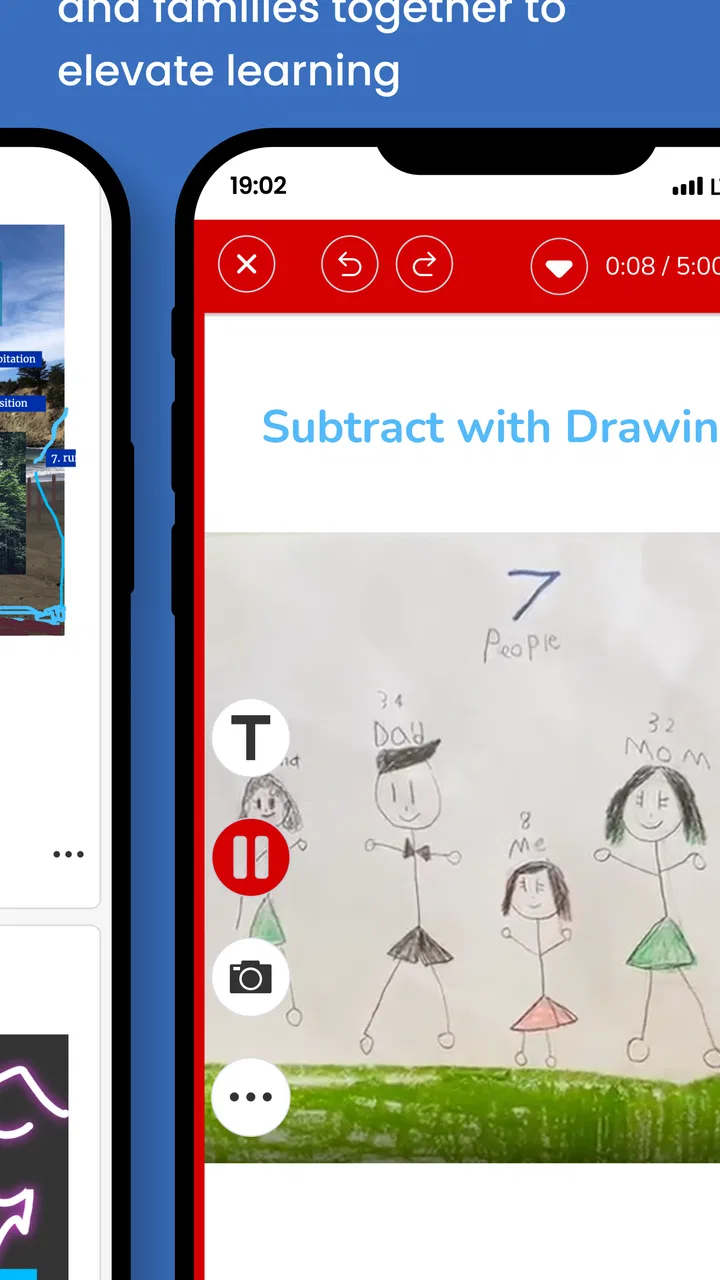
What appealed to me most is the way the platform can accommodate different forms of classroom participation. A child may be able to explain an idea more confidently through a recording, drawing, photograph, or other classroom response than through a page of handwriting. That does not make every activity accessible automatically, but it gives teachers more room to vary how learning is presented and demonstrated. Its strongest inclusive quality is flexibility of expression, not a promise that every barrier disappears.
You May Also Like

 Blood Strike: 2.5 Anniversary
Blood Strike’s Loadouts Turn Every Drop Into a Tactical Gamble
A close look at Blood Strike’s custom loadouts: how fast access to signature weapons reshapes its battle royale rhythm, rewards preparation, and narrows the gap between fights.

 Pandora - Music & Podcasts
Pandora’s Music Is Easy to Start, but Harder to Recover
Pandora’s strength is its low-effort path from a seed to a station. Its weak spot is how much confidence it asks you to place in connection, setup, and quiet recovery.

 8 Ball Pool
 Is Built on Rivalries, Rematches, and Routine
A close look at the rivalries, rematches, shared routines, and unanswered safety questions that turn a quick pool match into a persistent mobile community.

 Samsung Music
’s Quiet Strength Is Playing What You Already Own
Its reach comes less from spectacle than from dependable access to a personal library. That simplicity is both the app’s strongest retention engine and its ceiling.

 AccuWeather: Weather Radar
AccuWeather Review: A Quick, Clear Forecast for Everyday Decisions
For everyday plans, the best forecast is the one you can understand quickly. AccuWeather makes rain timing, radar, and local conditions easy to act on, with a few trade-offs.

 Hill Climb Racing
Why Hill Climb Racing Still Turns Crashes Into One More Run
A tiny car, a bumpy hill and one more upgrade: Hill Climb Racing keeps resurfacing because its simple chaos makes every near-miss feel personal.
More From Our News Desk



How clearly the classroom experience is organized
I look at classroom organization as more than a tidy feed: it determines whether a child can move from seeing an assignment to knowing what to do without an adult translating each step. A useful check is to ask a pupil to find one task and explain its next action in their own words. That small test reveals whether the routine is genuinely clear, which leads into how different learners encounter the same workspace.
Readability and navigation in everyday use
The first thing I noticed is that Seesaw makes more sense when the classroom has a clear routine. A pupil typically needs to know where to look for assigned work, how to open an activity, how to add a response, and where feedback will appear. When those steps are introduced consistently, the app can feel less intimidating than a busy school portal filled with unrelated menus.
That simplicity is especially helpful for younger children. A teacher can keep the focus on the task instead of asking pupils to navigate several separate services for instructions, submission, and comments. Families also benefit from having a recognizable place to check classroom activity. The app is not a replacement for good teaching instructions, though. If every assignment is named differently or placed without a predictable pattern, the interface alone cannot prevent confusion.
I would encourage teachers to use short, concrete activity titles and to put the important action near the beginning of the instructions. This matters for children who are still developing reading confidence, pupils working in another language, and anyone who becomes overloaded by long blocks of text. A simple title such as “Record your explanation” is easier to act on than a clever but vague label.
For families, the main advantage is visibility. Seesaw can show that learning is happening through actual classroom work rather than only through a final grade. That gives a parent or caregiver a better starting point for conversation: they can ask how a child made a drawing, why a recording was chosen, or what part of an activity felt difficult. The trade-off is that frequent updates can become noisy if a classroom posts every small step without a clear rhythm.
Teachers should also think about visual consistency. Reusing familiar wording, keeping instructions in one place, and avoiding unnecessary decoration can make activities easier to scan. This is not a special accessibility mode; it is a practical design habit that benefits almost everyone. In my testing mindset, the clearest Seesaw classrooms are not necessarily the ones with the most elaborate posts. They are the ones where students can predict what happens next.
Different ways for children to show understanding
The platform’s educational value becomes more apparent when a teacher deliberately offers choices. A child who struggles with handwriting might explain an answer verbally. Another pupil may need to sketch a process before writing about it. A learner who is anxious about speaking in front of classmates may prefer to submit a private response for teacher review, where that workflow is appropriate.
This flexibility can also help reveal knowledge that conventional worksheets hide. A child may understand a science idea but lose marks because writing is slow. A visual response or spoken explanation gives the teacher another way to notice the underlying understanding. I would not use this to remove writing practice altogether, but it can prevent handwriting speed from becoming the only thing being assessed.
There is a useful trade-off here. More response options can support inclusion, but they can also make assessment less consistent if expectations are vague. Teachers need to explain whether a drawing, recording, or written answer should contain the same evidence. Otherwise, students may spend more energy guessing which format is acceptable than thinking about the subject.
One practical workflow is to provide a common question and then offer two or three response routes, while keeping the success criteria identical. That approach makes choice meaningful instead of turning accessibility into an unstructured free-for-all. It also helps families understand that a different format is still serious academic work.
Supporting pupils who need more processing time
Seesaw can fit classrooms where children work at different speeds, but the teacher’s setup determines whether that potential is realized. A pupil who needs extra time may benefit from being able to return to an activity rather than having to complete everything in one sitting. Clear deadlines and gentle reminders are still important, because an open digital workspace can otherwise become a collection of unfinished tasks.
I would avoid posting several new activities at once for a class that includes pupils who find task switching difficult. A smaller sequence, with one visible next step, is easier to manage. Teachers can also separate instructions from extension work so that a child does not mistake optional material for another required assignment.
For parents and caregivers, the key question is not simply whether work appears in the app. It is whether the child can understand what is expected without constant adult translation. If a family has to explain every instruction, the issue may be the activity design rather than the child’s ability. Seesaw works best when the classroom’s digital habits are as thoughtful as its lesson plans.
Motor, sensory, and situational access
I find it helpful to separate access needs from assumptions about a child’s ability. A pupil may manage an activity easily on a quiet afternoon but struggle with it on a crowded bus, a shared device, or a noisy kitchen table. Thinking through those ordinary circumstances makes it easier to judge which response options offer real choice and which simply shift the effort elsewhere.
Reducing dependence on one physical skill
From an inclusion perspective, the most promising part of Seesaw is that classroom evidence does not have to be limited to fast handwriting or precise keyboard input. Depending on the activity created by the teacher, a pupil may be able to use a camera, drawing tools, or voice input to communicate. That can reduce the pressure on children with limited fine-motor control, temporary injuries, or fatigue.
Still, every alternative introduces its own demands. Taking a photograph requires positioning a device. Drawing on a screen requires controlled movement. Recording speech requires a setting where the child feels comfortable and where background noise does not make the result difficult to understand. A teacher should never assume that “digital” means effortless.
A better approach is to offer a choice without making the child publicly justify it. If a pupil can submit an explanation in a format that works for them, the teacher can focus on the learning objective rather than turning the method of submission into another hurdle. This is one of the clearest ways I see Seesaw supporting different abilities: it can shift attention from a single delivery method to the quality of the thinking.
Sensory load and the classroom environment
Digital learning can help some sensory needs and worsen others. A child who finds busy paper worksheets overwhelming may appreciate a focused activity on a screen. Another child may find notifications, changing images, audio, or a crowded feed distracting. The app cannot decide which presentation style is comfortable for each learner, so the teacher has to make those choices deliberately.
I would recommend using audio only when it adds value, rather than attaching spoken instructions to every task. Written directions can be easier to revisit, while a short recording may help a pupil who benefits from hearing the teacher’s explanation. Providing both can be useful, but duplicating every instruction in several formats may create clutter and increase the amount a child must process.
Visual design also matters. Short paragraphs, strong contrast in teacher-created materials, and a clear order of steps are more useful than decorative templates. If a worksheet is uploaded as a dense image, the fact that it is inside Seesaw does not make it easier to read. Teachers should check their own materials on a smaller screen before assigning them, because a layout that looks fine on a large classroom display may be tiring on a phone.
Using the app in real family situations
Imagine a child arriving home tired after a demanding school day. The family opens Seesaw and sees a reading response that can be completed with a short recording instead of a long written paragraph. That may make the task manageable without lowering the intellectual expectation. The child still has to explain the reading, but the family is not forced to turn the evening into a handwriting battle.
In another situation, a caregiver may have limited time or may not be comfortable with the school’s language. A visual example and a concise instruction can be easier to follow than a long message from several different systems. The app can therefore support communication, but only when teachers avoid assuming that every household has the same device, quiet space, internet access, or adult availability.
This is where situational access becomes important. A pupil may have no diagnosed disability and still struggle to participate because they are sharing a device, working in a noisy room, or completing an activity while caring for a younger sibling. Flexible response formats can help, but teachers should also avoid designing tasks that require uninterrupted recording or constant live participation when the learning goal does not depend on it.
What happens when access is interrupted
Families choosing Seesaw should think about reliability in practical terms. If a child cannot connect at the expected time, the classroom needs a fallback plan. A digital platform is most inclusive when missing a moment does not mean missing the entire lesson. Teachers can reduce this risk by making instructions understandable after the live event and by accepting a later response where appropriate.
That is not a feature I would treat as automatic; it is a policy decision for the school. The app can provide the shared space, but the teacher decides whether flexibility is real. Parents should ask how late work, device problems, and alternative submissions are handled before assuming that online access equals equal access.
Where friction and barriers remain
I pay particular attention to the point where flexibility stops helping and begins adding decisions, extra steps, or pressure to keep checking. That friction can affect students and caregivers differently, so a classroom routine should make expectations explicit without making families feel they must be available at all times. The remaining question is how well the setup handles those barriers in practice.
Teacher-created content can make or break the experience
Seesaw is not a magic filter that turns inaccessible material into accessible material. If an educator uploads a tiny, blurry worksheet, writes instructions in complicated language, or expects every pupil to use the same response method, the platform may simply deliver the barrier more efficiently.
This is the most important limitation for me. The app’s inclusive potential depends on the decisions around it. A school that adopts Seesaw without training teachers to create readable, flexible activities may see little improvement. Conversely, a thoughtful teacher can use the same workspace to give pupils more control over how they participate.
There can also be a tension between family visibility and student independence. Parents may appreciate seeing work, but a child can feel watched if every draft becomes part of a visible stream. Teachers should be careful about what is shared, when it is shared, and whether pupils have room to make mistakes without feeling that every attempt is a performance.
Notifications, expectations, and digital fatigue
Another source of friction is the expectation that families will check regularly. For some households, this is convenient. For others, it adds another channel to monitor alongside school email, messaging groups, and paper notices. If Seesaw becomes the place for every announcement, the volume can undermine the clarity that made the app useful in the first place.
I would prefer a classroom routine that distinguishes learning activities from urgent information. Students should be able to identify what needs action today without searching through a long feed. Families also need reasonable expectations about response times; a platform that supports communication should not quietly turn into an always-on demand.
Children with attention differences may need especially clear boundaries. A teacher can help by grouping related work, limiting optional distractions, and stating exactly when an activity is complete. Without those boundaries, the freedom to explore can feel like uncertainty.
When another option may fit better
Seesaw is a strong choice for elementary and mixed-ability classrooms that want students to document learning in varied ways and let families see that process. I would be less enthusiastic for an organization looking primarily for a complex learning-management system with extensive course administration, advanced assessment workflows, or highly structured adult training. In that situation, a more formal platform may be a better match.
I would also hesitate to recommend it as the only tool for a course built around long-form writing, intensive live discussion, or specialized professional instruction. Its appeal is the closeness between classroom activity, student evidence, and family awareness. If those are not the central needs, the extra flexibility may not justify another app for everyone to learn.
Before adopting it, a school should run a small trial with actual pupils and caregivers. Test an ordinary assignment, a missed connection, a student who needs an alternative response, and a family using a smaller screen. That will reveal more than a feature checklist. Pay attention to how many explanations adults must give and how easily a child can tell what to do next.
My inclusive verdict after using it as a learning workspace
I see Seesaw as a practical bridge between classroom work and home awareness, with genuine value for learners who need more than one way to communicate. It can make a child’s thinking visible through formats that are less dependent on handwriting speed, confidence in front of a group, or a single type of worksheet. The free price also removes one obvious financial barrier for families and schools considering a starting point.
At the same time, I would not describe it as universally accessible by default. The quality of the experience rests on readable instructions, sensible activity design, careful sharing habits, and a realistic plan for children who cannot always connect or respond in the expected way. Those requirements are not minor details; they determine whether flexibility becomes genuine support or simply another set of choices to navigate.
For a teacher, my advice is to begin with one predictable workflow: explain the goal, offer limited response choices, show what successful work looks like, and make the next step obvious. For a family, I would ask how the school handles missed work, alternative formats, and the amount of checking expected at home. For a pupil, the best sign is simple: can you open an activity and understand what you are being asked to show?
My final recommendation is positive, with conditions. If your school wants a child-friendly education app that connects assignments, student expression, and family participation, Seesaw is worth considering. If you need a highly specialized system or your school cannot commit to consistent, inclusive content design, another tool may serve you better. Seesaw is most successful when it is used to widen participation, not merely to move ordinary worksheets onto a screen.
As a free app in the Education category, developed by Seesaw Learning and rated for Everyone, it is approachable for a broad audience. Its release history reaches back to June 24, 2015, which helps explain why it has become familiar in many learning environments. I would choose it for a classroom that values visible progress and multiple ways to respond, while keeping a separate backup routine for access problems and remembering that thoughtful teaching—not the interface alone—is what makes inclusion work.
FAQs for Seesaw
01What is Seesaw and who is it designed for?
Seesaw is a digital learning platform designed primarily for elementary and early-years classrooms. It gives students a place to complete activities, create digital work, and share learning with teachers and, depending on the school’s setup, family members. The app is most useful when a teacher or school has already created a class, since many of its features depend on an invitation or classroom access code.
02Is Seesaw free to download and use?
The Seesaw app can generally be downloaded at no cost, but access to features depends on the account and subscription provided by the school or teacher. Some classrooms use the basic version, while schools may purchase additional tools through a paid plan. Parents and students should check the invitation details or ask the school which version is available before assuming every feature will be included.
03How do students and parents log in to Seesaw?
Login methods vary according to the classroom configuration. Students may sign in with a class code, QR code, email address, or school-managed account, while family members usually receive a separate invitation from the teacher. It is important to use the correct role and login details, because a family account and a student account provide different views and permissions within the app.
04What can students do inside the Seesaw app?
Students can use Seesaw to view teacher-posted assignments, respond with drawings, photos, videos, audio recordings, text, links, and other digital creations, depending on the tools enabled by the classroom. They can also review feedback and build a learning portfolio over time. The experience is especially engaging for younger learners because it supports multiple ways to demonstrate understanding rather than relying only on typed answers.
05Is Seesaw safe for children and does it protect privacy?
Seesaw is built for use in educational environments and includes teacher-managed classrooms, moderation controls, and family access settings. However, privacy also depends on how a school configures accounts, sharing permissions, and student information. Parents should review the school’s privacy policy, understand who can see uploaded work, and ensure children use the platform only for classroom activities rather than sharing unnecessary personal information.
Pros
- Simple interface makes classroom activities easy to access.
- Supports photos
- videos
- drawings
- notes
- and voice recordings.
- Parents can follow their child’s progress from home.
- Encourages students to share work and reflect on learning.
- Useful communication channel between teachers and families.
Cons
- Some features depend on the teacher’s chosen Seesaw plan.
- Notifications can become frequent for families and students.
- Uploading media may use significant mobile data.
- The experience varies greatly between different classroom setups.
- Older devices may struggle with larger photos or video uploads.

Seesaw
Gallery